
The 2.5 3D Engine Map Editor
The 2.5 3D Engine Map Editor
RC3D World Editor
The RC3D World Editor is a dedicated level-authoring environment built specifically for creating and testing worlds used by the RC3D 2.5D engine.
It provides a top-down workspace for constructing sectors, walls, portals, objects, triggers and navigation routes, together with an inspector for editing the properties of every part of the map.
Unlike a general-purpose drawing program, the editor understands the structure and behaviour of an RC3D world. Walls can be connected into sectors, sectors can be linked through portals, objects can be assigned game-play functions, and textures can be configured using the same properties supported by the runtime engine.
The editor also includes textured map views and an isometric preview, allowing a level to be inspected visually before it is launched inside RC3D.
Maps can be saved in an editable text format, validated and repaired, exported into the compact runtime format, and launched directly into the engine for immediate testing.
It provides a top-down workspace for constructing sectors, walls, portals, objects, triggers and navigation routes, together with an inspector for editing the properties of every part of the map.
Unlike a general-purpose drawing program, the editor understands the structure and behaviour of an RC3D world. Walls can be connected into sectors, sectors can be linked through portals, objects can be assigned game-play functions, and textures can be configured using the same properties supported by the runtime engine.
The editor also includes textured map views and an isometric preview, allowing a level to be inspected visually before it is launched inside RC3D.
Maps can be saved in an editable text format, validated and repaired, exported into the compact runtime format, and launched directly into the engine for immediate testing.
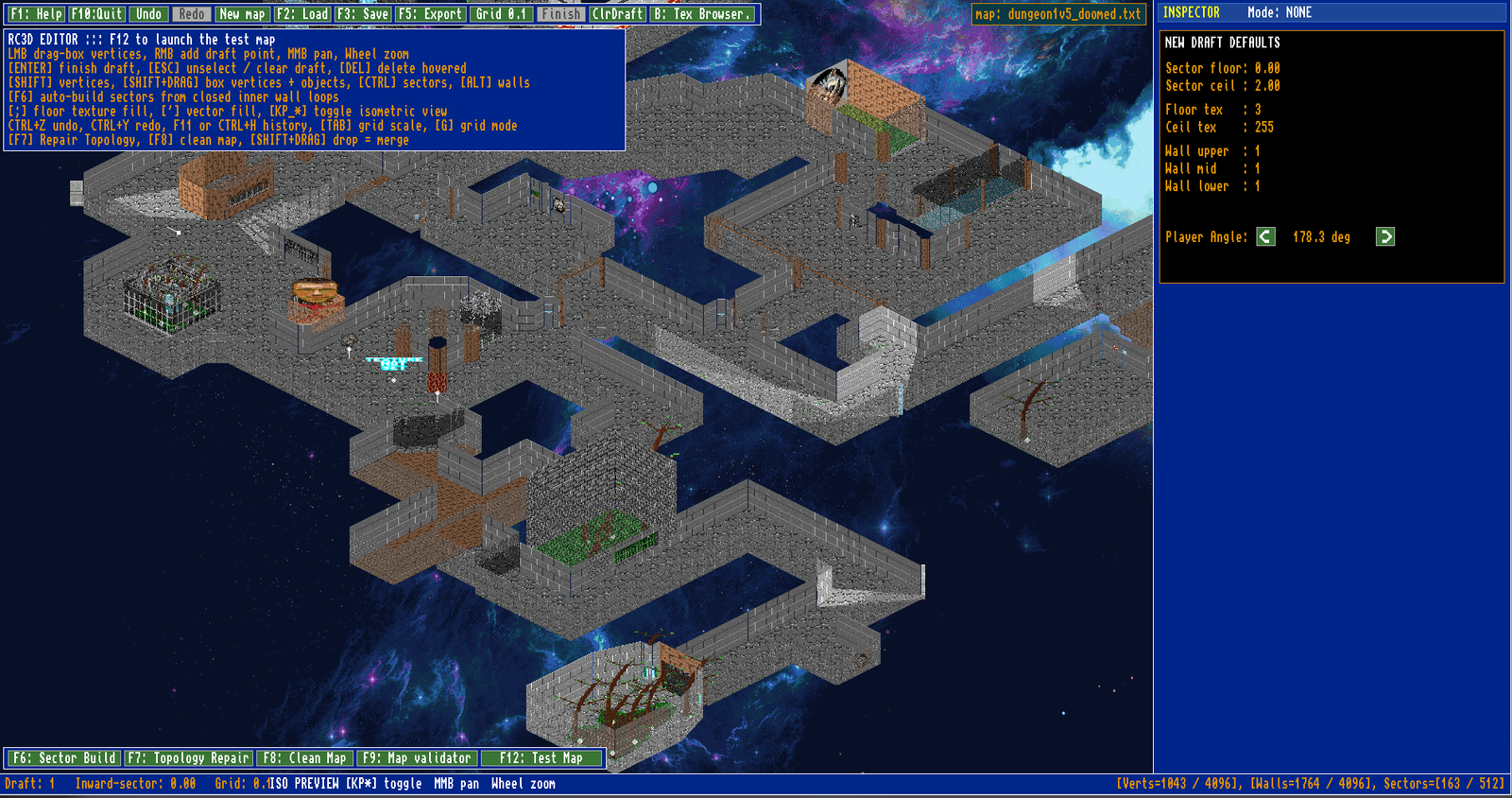
The RC3D World Editor’s isometric preview displays sector geometry, wall and floor textures, sprites and height differences
Constructing Sectors and Geometry
RC3D maps are created by placing vertices and connecting them with freely positioned wall segments. Closed wall loops can then be converted into sectors, forming the rooms, corridors and outdoor areas used by the engine.
The editor is not restricted to square tiles. Walls may be placed at different angles and lengths, allowing irregular spaces, curved approximations, narrow passages and more complex architectural shapes.
New sectors can be drawn from scratch, created inside existing areas, or extruded from selected walls. Geometry can be selected individually or in groups, then moved, rotated, copied and adjusted directly on the map grid.
When sectors share an opening, the editor can create and maintain the portal connection between them. This allows neighbouring areas to use different floor and ceiling heights while still appearing as one continuous world inside RC3D.
Grid snapping can be changed while working, providing precise alignment for structural areas while still working, providing precise alignment allowing finer placement where more detailed geometry is required.
The editor is not restricted to square tiles. Walls may be placed at different angles and lengths, allowing irregular spaces, curved approximations, narrow passages and more complex architectural shapes.
New sectors can be drawn from scratch, created inside existing areas, or extruded from selected walls. Geometry can be selected individually or in groups, then moved, rotated, copied and adjusted directly on the map grid.
When sectors share an opening, the editor can create and maintain the portal connection between them. This allows neighbouring areas to use different floor and ceiling heights while still appearing as one continuous world inside RC3D.
Grid snapping can be changed while working, providing precise alignment for structural areas while still working, providing precise alignment allowing finer placement where more detailed geometry is required.
Editing Properties and Textures
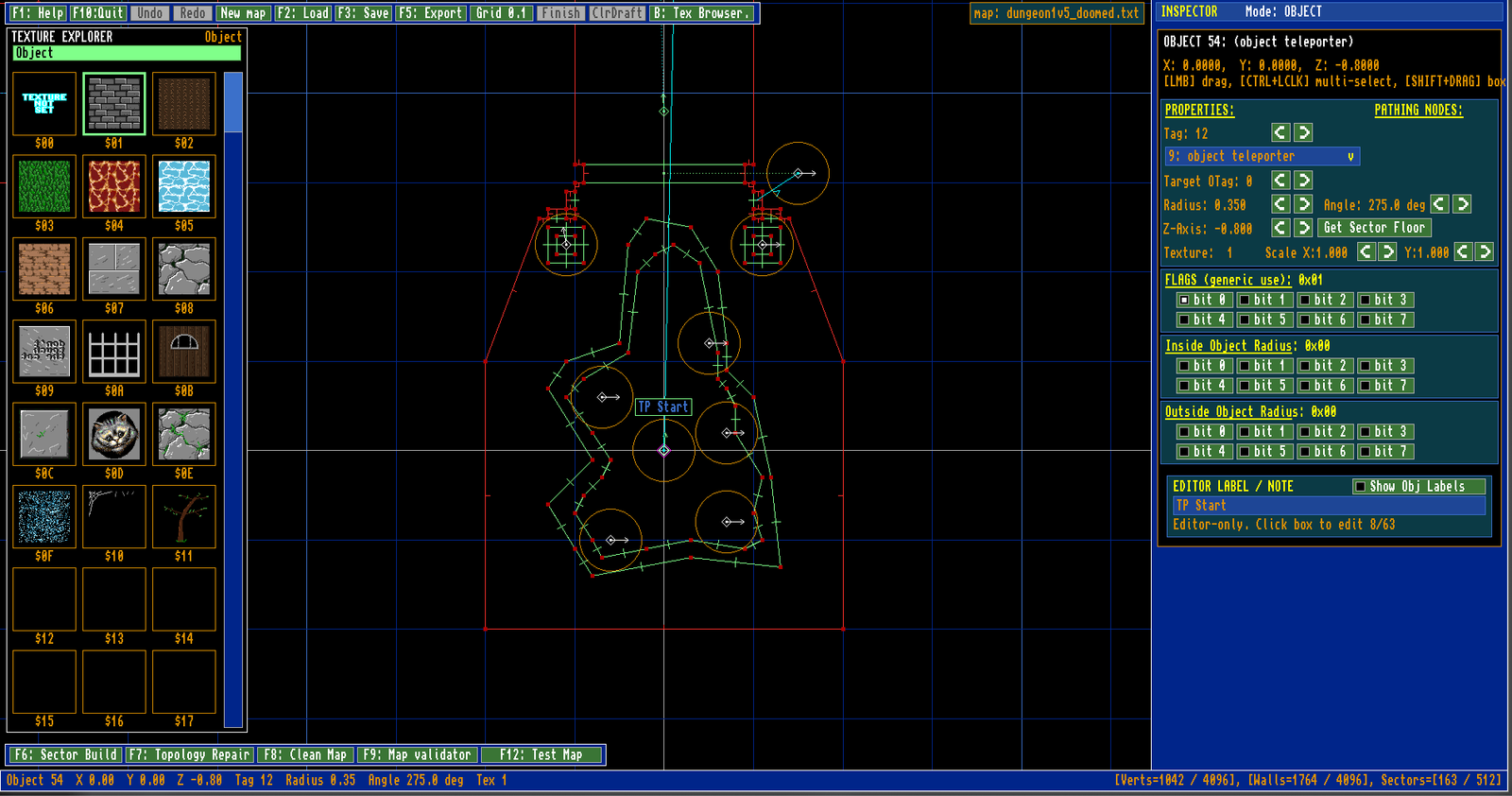
The Inspector changes according to the type of item selected, providing dedicated controls for vertices, walls, sectors and objects without cluttering the main map workspace.
Walls can use separate upper, middle and lower textures, allowing each part of a portal or solid surface to be configured independently.
Textures may be scaled, offset, rotated, flipped and clamped, while brightness settings allow individual walls to be adjusted separately from the surrounding sector.
Wall properties also define how the surface behaves inside RC3D. A wall may be solid, portal-connected, transparent, double-sided, clickable or configured as part of a door or other interactive mechanism.
Sector controls provide access to floor and ceiling heights, surface textures, lighting levels and movement ranges. These settings allow the same geometry to become a normal room, a raised platform, a lift, a moving ceiling or an area with its own visual and game-play behaviour.
Objects have their own position, height, angle, scale, texture, radius, type, tag and trigger settings. Editor-only labels can also be attached to important objects, making complex mechanisms and navigation systems easier to understand while constructing a level.
Properties can be copied from one item and pasted onto another, making it much faster to apply consistent textures and behaviour across a large map.
Walls can use separate upper, middle and lower textures, allowing each part of a portal or solid surface to be configured independently.
Textures may be scaled, offset, rotated, flipped and clamped, while brightness settings allow individual walls to be adjusted separately from the surrounding sector.
Wall properties also define how the surface behaves inside RC3D. A wall may be solid, portal-connected, transparent, double-sided, clickable or configured as part of a door or other interactive mechanism.
Sector controls provide access to floor and ceiling heights, surface textures, lighting levels and movement ranges. These settings allow the same geometry to become a normal room, a raised platform, a lift, a moving ceiling or an area with its own visual and game-play behaviour.
Objects have their own position, height, angle, scale, texture, radius, type, tag and trigger settings. Editor-only labels can also be attached to important objects, making complex mechanisms and navigation systems easier to understand while constructing a level.
Properties can be copied from one item and pasted onto another, making it much faster to apply consistent textures and behaviour across a large map.
Texture Browsing and Visual Preview
The RC3D World Editor includes a built-in Texture Explorer for browsing and assigning the textures available to the current map.
Textures are displayed as visual thumbnails rather than requiring their numeric identifiers to be remembered. The explorer changes according to the selected item, allowing textures to be assigned to objects, sector floors and ceilings, or the upper, middle and lower sections of a wall.
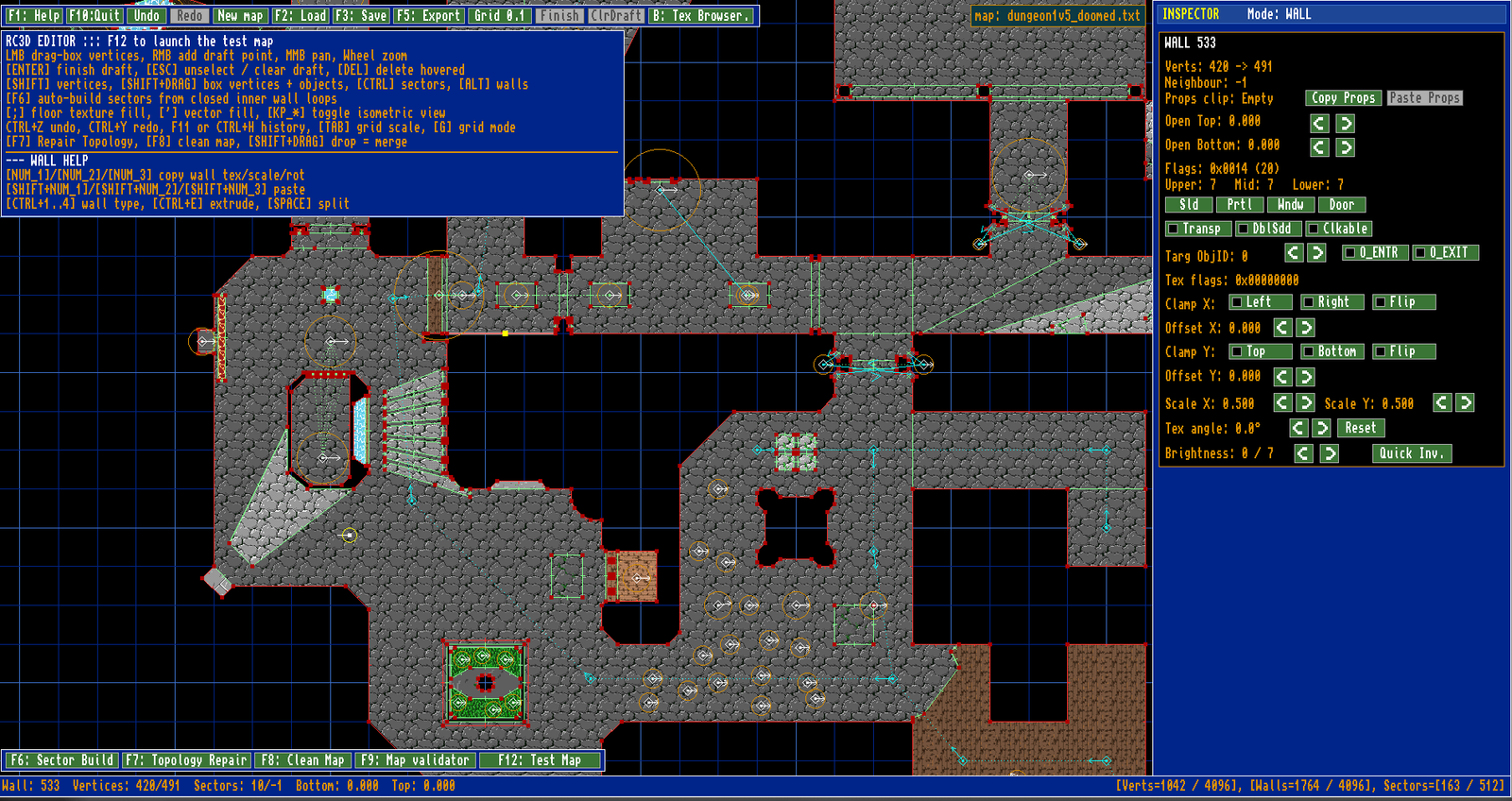
The normal top-down workspace can display textured floors and objects directly on the map. This makes it easier to identify different areas, check surface choices and understand a large level without relying only on wire-frame geometry.
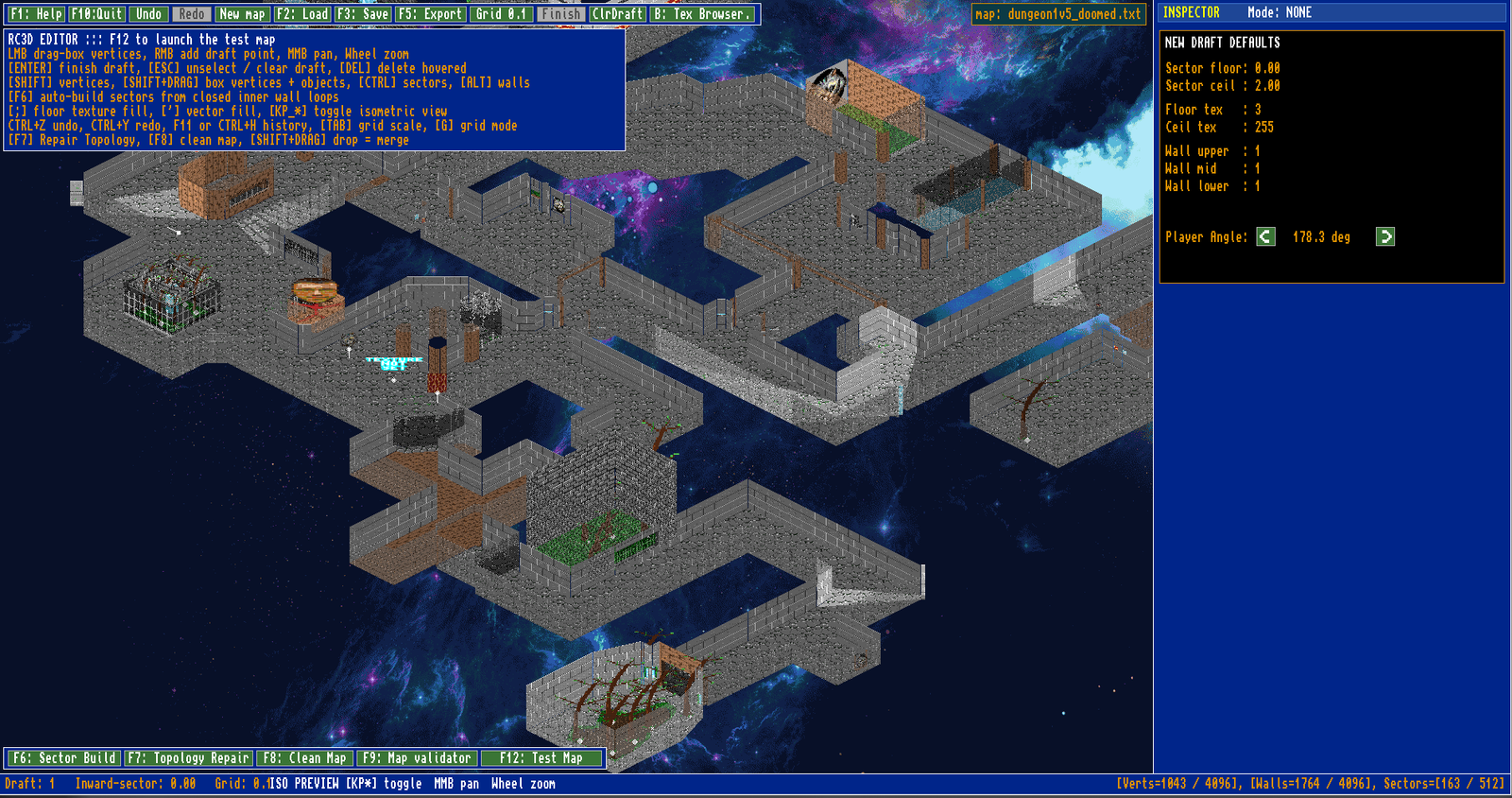
An isometric preview provides a more complete view of the world. It uses the sector heights, wall textures, floor surfaces and placed objects to construct an angled representation of the map inside the editor.
This preview makes differences in height, connected rooms, raised platforms, open areas and decorative objects much easier to inspect.
The view can be panned and zoomed, allowing both complete maps and smaller architectural details to be examined without launching RC3D.
Together, the Texture Explorer and visual preview modes provide an immediate connection between the technical map structure and the world that will eventually appear inside the engine.
Textures are displayed as visual thumbnails rather than requiring their numeric identifiers to be remembered. The explorer changes according to the selected item, allowing textures to be assigned to objects, sector floors and ceilings, or the upper, middle and lower sections of a wall.
The normal top-down workspace can display textured floors and objects directly on the map. This makes it easier to identify different areas, check surface choices and understand a large level without relying only on wire-frame geometry.
An isometric preview provides a more complete view of the world. It uses the sector heights, wall textures, floor surfaces and placed objects to construct an angled representation of the map inside the editor.
This preview makes differences in height, connected rooms, raised platforms, open areas and decorative objects much easier to inspect.
The view can be panned and zoomed, allowing both complete maps and smaller architectural details to be examined without launching RC3D.
Together, the Texture Explorer and visual preview modes provide an immediate connection between the technical map structure and the world that will eventually appear inside the engine.
Objects, Triggers and Navigation
The RC3D World Editor includes a dedicated object system for placing characters, decorations, effects, teleporters, navigation nodes and other interactive elements inside the map.
Each object can be positioned independently and assigned its own height, angle, scale, texture, radius, type and tag. This allows the same editor to manage both simple visual objects and more complex gameplay components.
Objects and sectors can use tags to connect different parts of the level. A trigger placed in one area may activate a door, move a floor, change a light level or control another object elsewhere in the map.
Teleporters can be created as linked pairs, with the editor storing the destination, facing direction and other properties required by the runtime engine.
The editor also supports navigation routes built from linked nodes. These routes can be inspected visually, adjusted directly on the map and used to guide enemies through connected sectors.
Path previews help show how objects are connected, while navigation data can be baked into the map for use by RC3D during game-play.
Editor-only labels may be attached to important objects, making large
levels easier to understand when several triggers, routes and linked
mechanisms are present at the same time.
Each object can be positioned independently and assigned its own height, angle, scale, texture, radius, type and tag. This allows the same editor to manage both simple visual objects and more complex gameplay components.
Objects and sectors can use tags to connect different parts of the level. A trigger placed in one area may activate a door, move a floor, change a light level or control another object elsewhere in the map.
Teleporters can be created as linked pairs, with the editor storing the destination, facing direction and other properties required by the runtime engine.
The editor also supports navigation routes built from linked nodes. These routes can be inspected visually, adjusted directly on the map and used to guide enemies through connected sectors.
Path previews help show how objects are connected, while navigation data can be baked into the map for use by RC3D during game-play.
Editor-only labels may be attached to important objects, making large
levels easier to understand when several triggers, routes and linked
mechanisms are present at the same time.
Validation, Repair and Rapid Testing
The RC3D World Editor includes several tools for checking the health of a map before it is exported or launched inside the engine.
The Map Validator can detect invalid wall references, broken portal connections, zero-length walls, orphaned vertices, incomplete sector boundaries and impossible floor or ceiling settings. Selecting a reported issue takes the editor directly to the affected part of the map, making faults easier to locate and correct.
Topology repair tools can rebuild damaged relationships between walls, vertices and sectors, while the map-cleaning system removes unused geometry and other data that is no longer required.
The editor also maintains a large undo and redo history, allowing geometry, properties and object changes to be reversed without losing the rest of the level. This is especially useful when editing several connected sectors or making large structural changes.
Maps are stored in an editable text-based format while they are being developed. When a level is ready for use, the editor can export it into the compact binary format used by RC3D.
The current map can also be launched directly into the runtime engine for immediate testing. This creates a fast development cycle in which a level can be edited, validated, exported, tested and returned to the editor without manually moving files between separate tools.
The Map Validator can detect invalid wall references, broken portal connections, zero-length walls, orphaned vertices, incomplete sector boundaries and impossible floor or ceiling settings. Selecting a reported issue takes the editor directly to the affected part of the map, making faults easier to locate and correct.
Topology repair tools can rebuild damaged relationships between walls, vertices and sectors, while the map-cleaning system removes unused geometry and other data that is no longer required.
The editor also maintains a large undo and redo history, allowing geometry, properties and object changes to be reversed without losing the rest of the level. This is especially useful when editing several connected sectors or making large structural changes.
Maps are stored in an editable text-based format while they are being developed. When a level is ready for use, the editor can export it into the compact binary format used by RC3D.
The current map can also be launched directly into the runtime engine for immediate testing. This creates a fast development cycle in which a level can be edited, validated, exported, tested and returned to the editor without manually moving files between separate tools.
A Complete World-Building Environment
The RC3D World Editor brings every part of level creation together in one dedicated environment built specifically around the needs of the RC3D engine.
Geometry, textures, lighting, portals, objects, triggers, navigation and interactive behaviour can all be created and adjusted from the same workspace. Visual previews make the structure of the world easier to understand, while validation and repair tools help keep increasingly complex maps reliable.
The editor was developed alongside RC3D rather than added afterwards.
As new engine features were introduced, the tools required to build, inspect and test them became part of the editor as well.
This close connection between editor and runtime allows changes to move quickly from an idea to a working test. A sector can be reshaped, a texture changed, a trigger added or a navigation route adjusted, then the complete map can be exported and launched immediately inside RC3D.
What began as a way to place walls and sectors has developed into a complete world-authoring system capable of building detailed indoor areas, outdoor environments, interactive mechanisms and populated game levels.
Together, RC3D and the RC3D World Editor form a complete foundation for creating original 2.5D games and interactive projects designed around the visual and technical character of SIDBOX.
Geometry, textures, lighting, portals, objects, triggers, navigation and interactive behaviour can all be created and adjusted from the same workspace. Visual previews make the structure of the world easier to understand, while validation and repair tools help keep increasingly complex maps reliable.
The editor was developed alongside RC3D rather than added afterwards.
As new engine features were introduced, the tools required to build, inspect and test them became part of the editor as well.
This close connection between editor and runtime allows changes to move quickly from an idea to a working test. A sector can be reshaped, a texture changed, a trigger added or a navigation route adjusted, then the complete map can be exported and launched immediately inside RC3D.
What began as a way to place walls and sectors has developed into a complete world-authoring system capable of building detailed indoor areas, outdoor environments, interactive mechanisms and populated game levels.
Together, RC3D and the RC3D World Editor form a complete foundation for creating original 2.5D games and interactive projects designed around the visual and technical character of SIDBOX.
Comments 0
Comments are reviewed before they appear publicly.
Leave a Comment