
The 2.5 3D engine developement
A project that is intended for the sidbox. A 2.5 3D graphics engine that works much like Doom. Portals, stepping, moving sectors and more.
RC3D — A Sector and Portal 2.5D Engine
RC3D is a custom 2.5D rendering engine designed for creating Doom-like environments using freely positioned walls, connected sectors, textured surfaces, sprites, lighting and interactive world geometry.
Unlike a traditional grid-based raycaster, RC3D maps are not built from square tiles. Rooms and outdoor areas are formed from arbitrary wall segments, while portals connect neighbouring sectors with different floor and ceiling heights.
For each column of the display, the engine casts a ray through the current sector, finds the nearest visible wall, draws its upper, middle and lower sections, and continues through any visible portal into the next area. This allows connected rooms, windows, steps, doors, lifts and open spaces to be rendered without using a full polygonal 3D pipeline.
The engine was designed around the SIDBOX display system, using a 480 × 320 indexed framebuffer and a 256-colour palette. Textures, distance lighting and ordered dithering work together to produce the grainy, high-contrast appearance seen throughout the demonstration map.
Unlike a traditional grid-based raycaster, RC3D maps are not built from square tiles. Rooms and outdoor areas are formed from arbitrary wall segments, while portals connect neighbouring sectors with different floor and ceiling heights.
For each column of the display, the engine casts a ray through the current sector, finds the nearest visible wall, draws its upper, middle and lower sections, and continues through any visible portal into the next area. This allows connected rooms, windows, steps, doors, lifts and open spaces to be rendered without using a full polygonal 3D pipeline.
The engine was designed around the SIDBOX display system, using a 480 × 320 indexed framebuffer and a 256-colour palette. Textures, distance lighting and ordered dithering work together to produce the grainy, high-contrast appearance seen throughout the demonstration map.
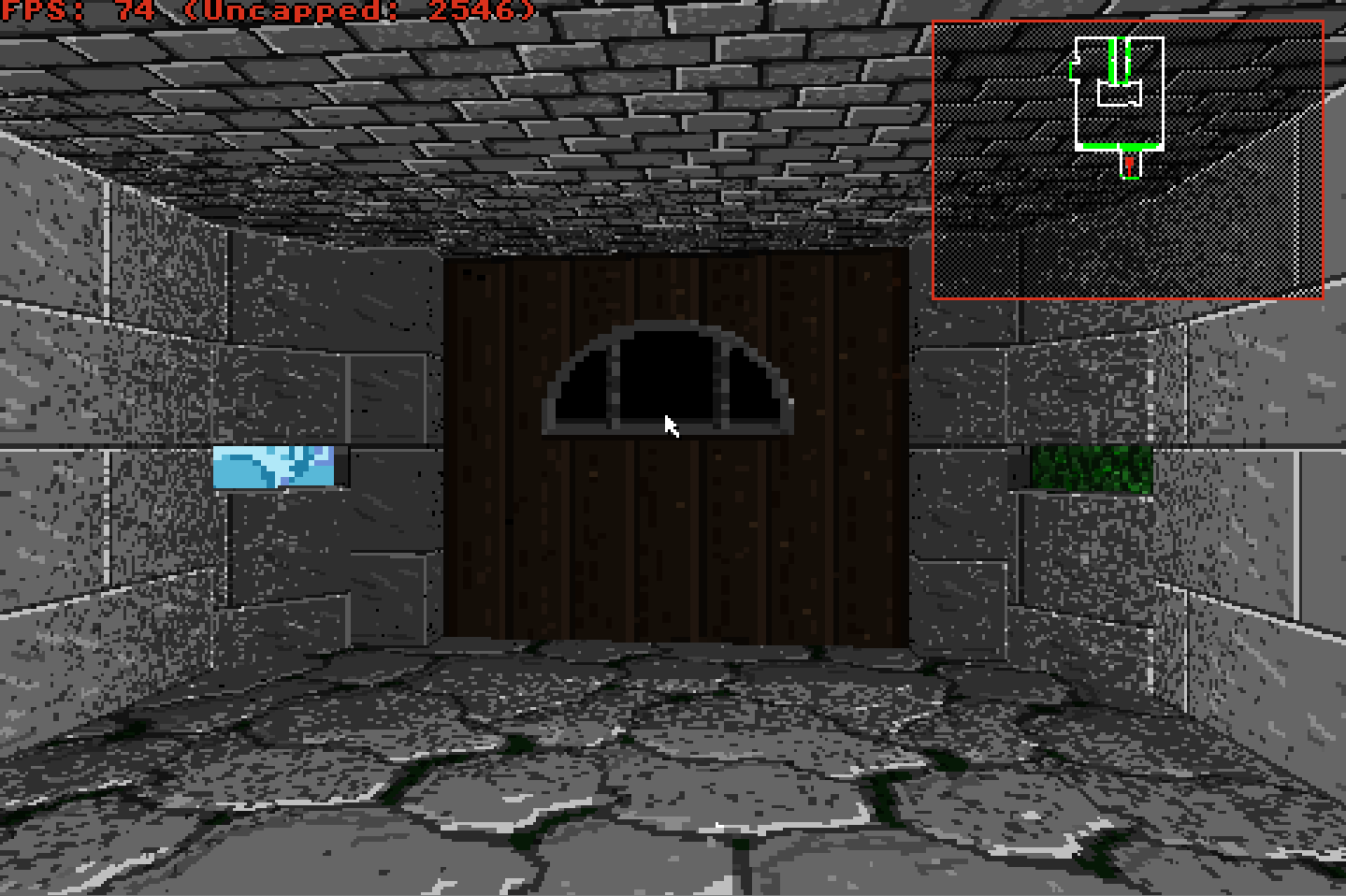
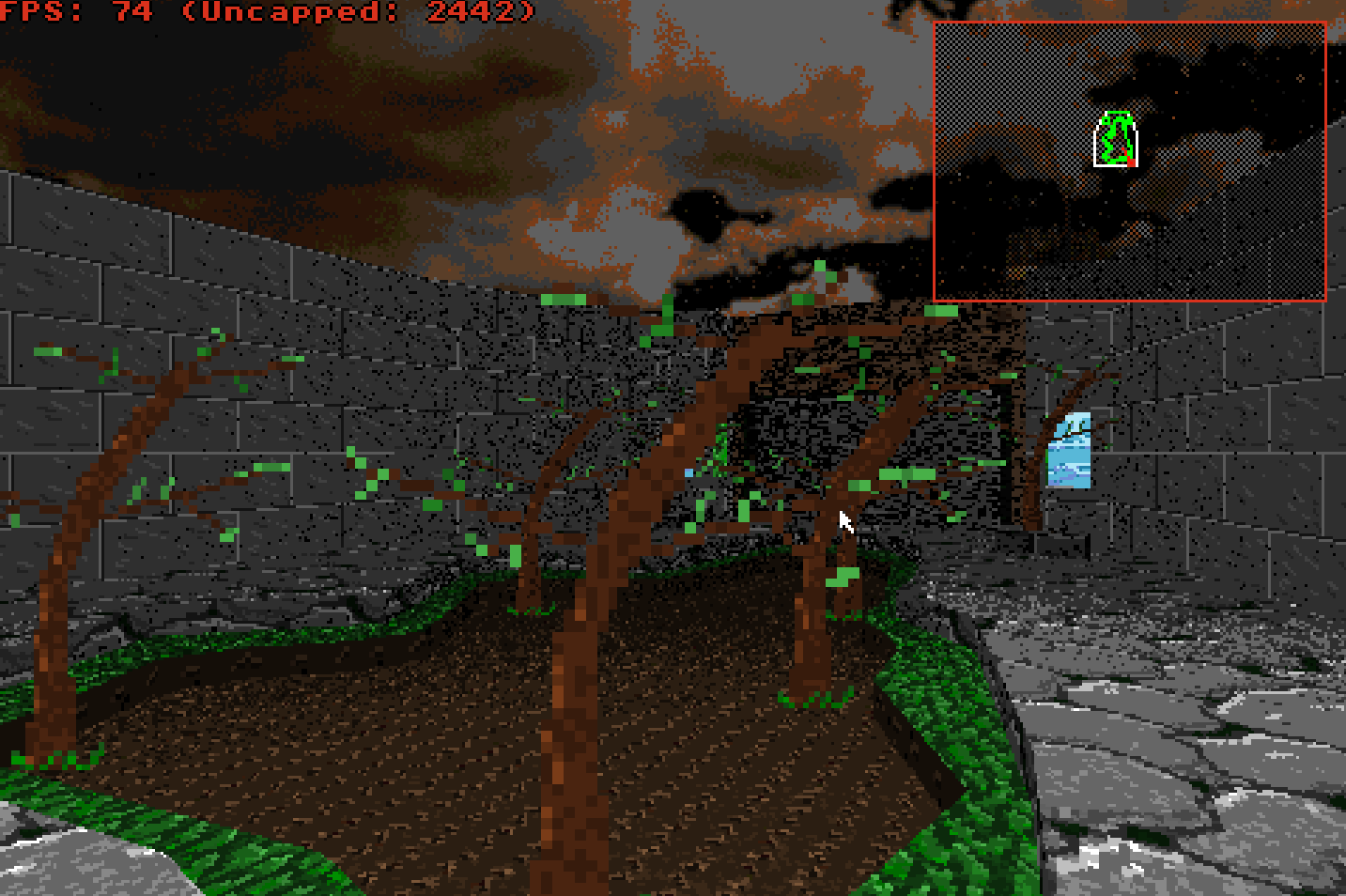
Sectors, Walls and Portals
RC3D worlds are divided into sectors. Each sector defines an area of the map together with its own floor height, ceiling height, textures, lighting and behaviour.
The outline of a sector is formed from freely positioned wall segments rather than square grid cells. This allows rooms, corridors and outdoor spaces to use angled walls and irregular shapes without being restricted to a tile map.
Walls can contain separate upper, middle and lower textures. A solid wall closes the sector completely, while a portal wall links it to a neighbouring sector.
When a ray reaches a portal, RC3D calculates the visible opening between the two sectors. Any wall above or below that opening is drawn, the remaining screen area is clipped, and the ray continues into the connected sector.
Because neighbouring sectors can have different floor and ceiling heights, the same system can create steps, windows, raised platforms, low passages, doors and lifts. What appears to be one continuous environment is therefore assembled from many connected areas, each with its own geometry and properties.
The outline of a sector is formed from freely positioned wall segments rather than square grid cells. This allows rooms, corridors and outdoor spaces to use angled walls and irregular shapes without being restricted to a tile map.
Walls can contain separate upper, middle and lower textures. A solid wall closes the sector completely, while a portal wall links it to a neighbouring sector.
When a ray reaches a portal, RC3D calculates the visible opening between the two sectors. Any wall above or below that opening is drawn, the remaining screen area is clipped, and the ray continues into the connected sector.
Because neighbouring sectors can have different floor and ceiling heights, the same system can create steps, windows, raised platforms, low passages, doors and lifts. What appears to be one continuous environment is therefore assembled from many connected areas, each with its own geometry and properties.
Textures, Lighting and the 256-Colour Palette
RC3D renders into a 480 × 320, 8-bit indexed frame-buffer using a 256-colour palette. Every pixel stores a palette index rather than a full RGB colour, allowing the engine to work within the same display system intended for SIDBOX hardware.
Walls, floors, ceilings and sprites use indexed textures, with most environment textures stored as compact 64 × 64 images. Wall textures can be scaled, offset, flipped and assigned independently to the upper, middle and lower sections of a wall.
Lighting is produced using several palette banks containing brighter, medium and darker versions of the same colours. RC3D selects between these banks according to sector lighting and distance from the player.
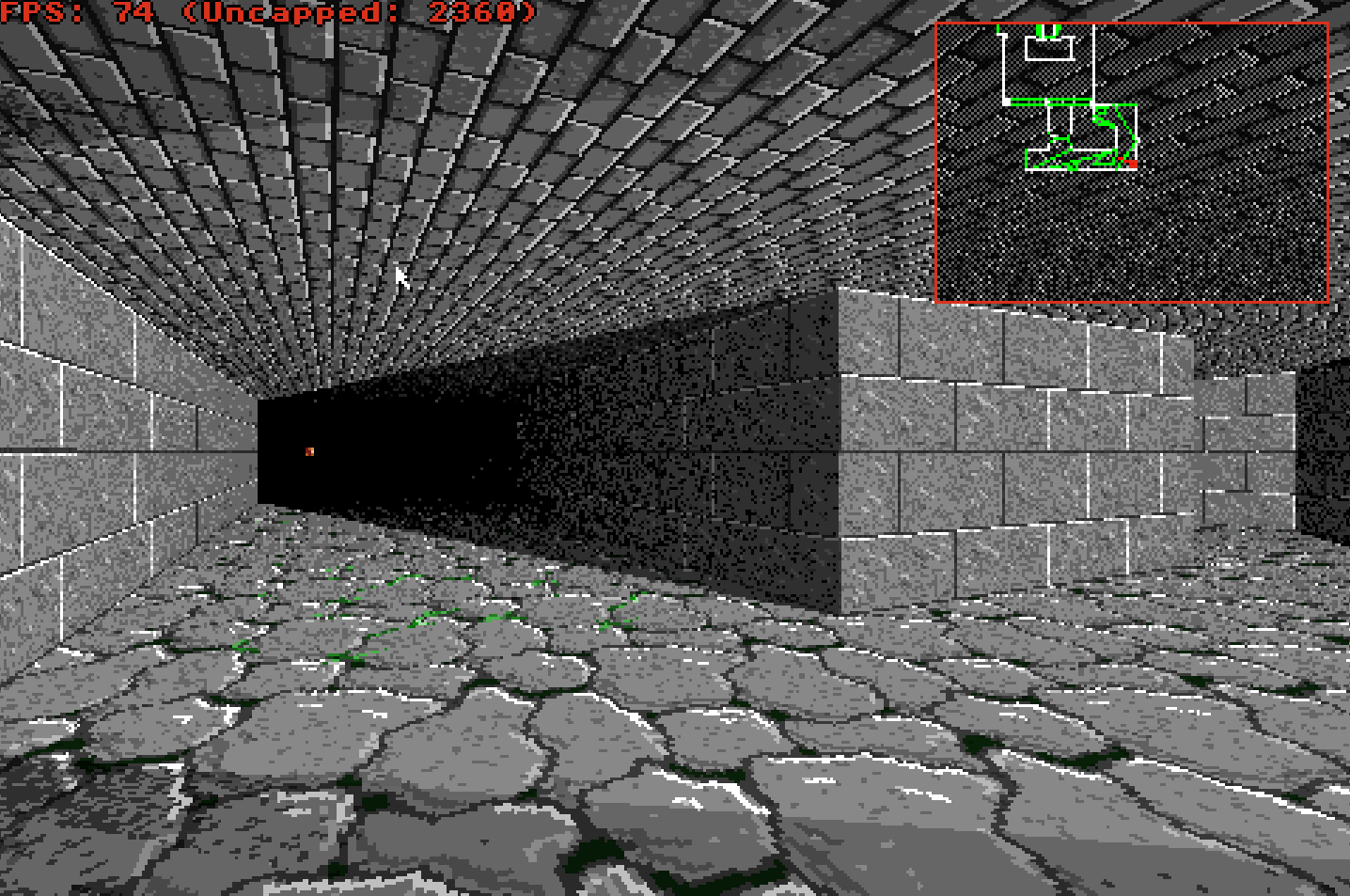
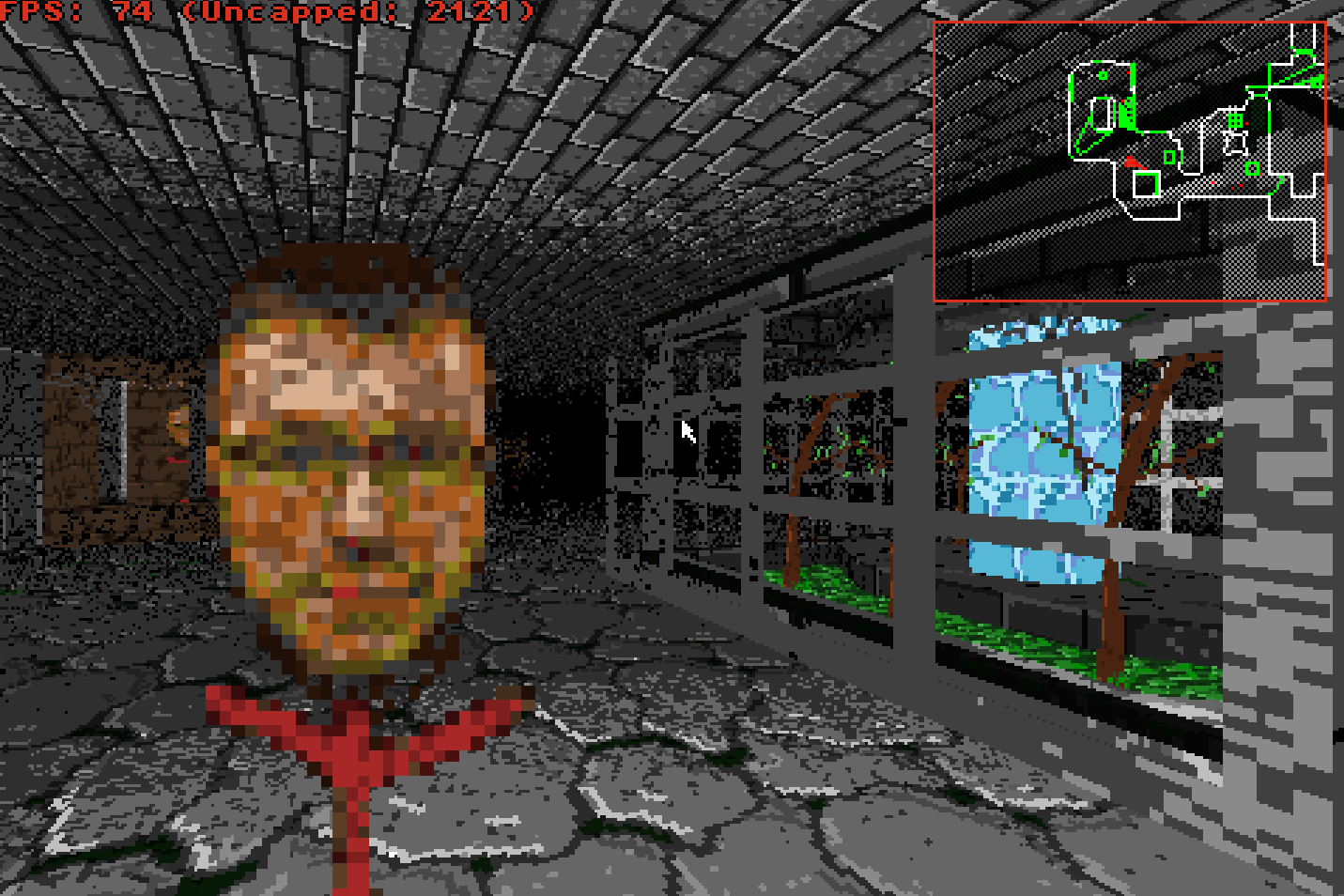
To avoid harsh jumps between lighting levels, the renderer applies ordered dithering between neighbouring palette banks. This creates the grainy, high-contrast shading visible throughout the demonstration map while still keeping every rendered pixel inside the 256-colour palette.
The result is a deliberately retro appearance that resembles early 1990s software rendering, while still supporting textured floors, ceilings, outdoor skies, transparent surfaces and differently lit areas.
Walls, floors, ceilings and sprites use indexed textures, with most environment textures stored as compact 64 × 64 images. Wall textures can be scaled, offset, flipped and assigned independently to the upper, middle and lower sections of a wall.
Lighting is produced using several palette banks containing brighter, medium and darker versions of the same colours. RC3D selects between these banks according to sector lighting and distance from the player.
To avoid harsh jumps between lighting levels, the renderer applies ordered dithering between neighbouring palette banks. This creates the grainy, high-contrast shading visible throughout the demonstration map while still keeping every rendered pixel inside the 256-colour palette.
The result is a deliberately retro appearance that resembles early 1990s software rendering, while still supporting textured floors, ceilings, outdoor skies, transparent surfaces and differently lit areas.
Distance lighting and ordered dithering create gradual depth across the floor, walls and curved passage while remaining inside the 256-colour indexed display.
Sprites, Transparency and Depth
RC3D uses billboard sprites for objects, decorations, effects and characters. Each sprite always faces the player, allowing detailed objects to exist inside the world without requiring full polygonal models.
Sprites are not simply drawn over the completed scene. During wall rendering, RC3D records the visible sector ranges and wall depth for each column of the display.
That information is then used to clip sprites against walls, doorways and portal openings.
This allows an object to appear correctly behind a wall, partly visible through a window, or hidden by the edge of a doorway rather than being drawn incorrectly over the top of the scene.
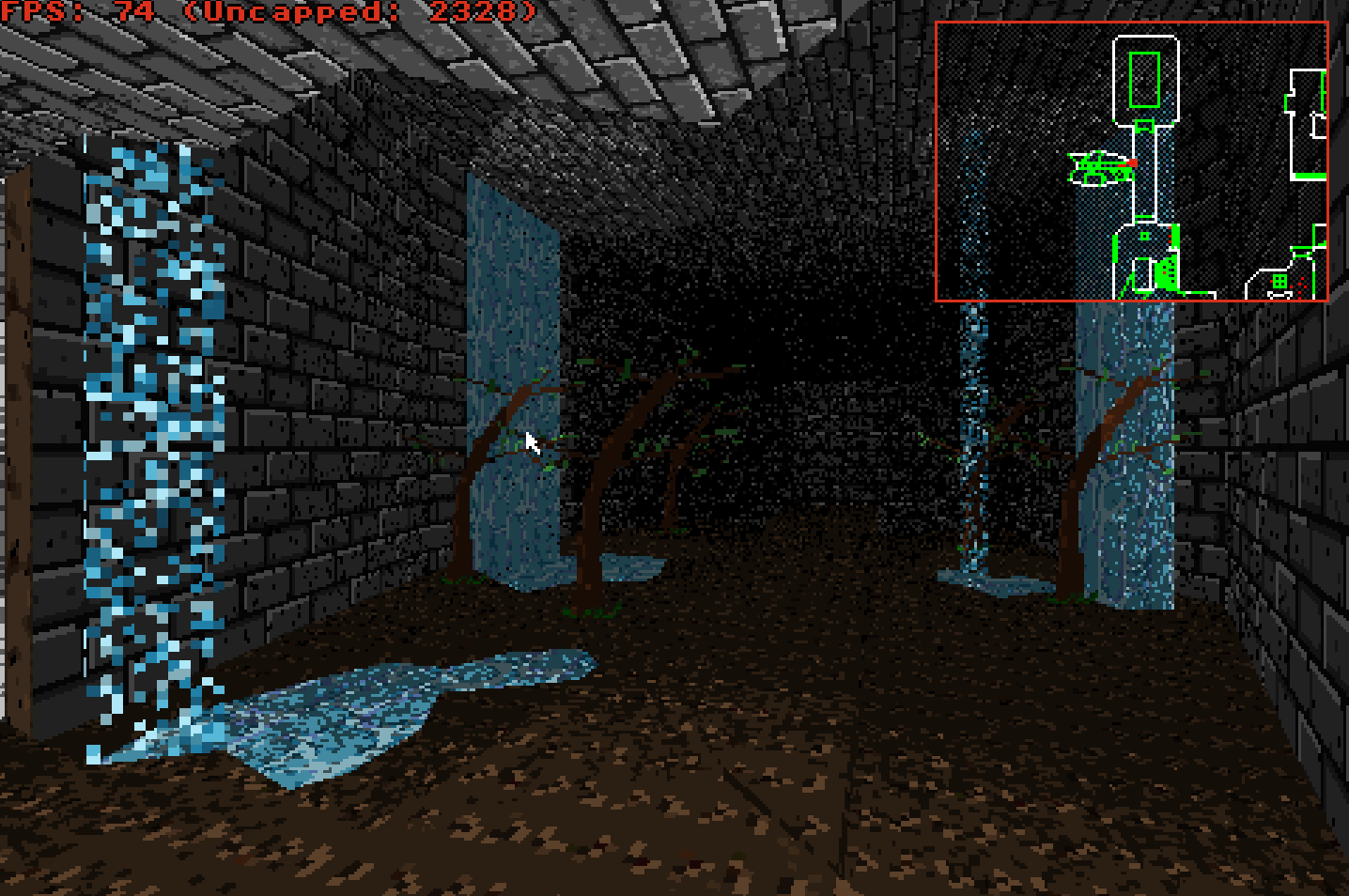
Walls can also support transparent and double-sided textures. These can be used for windows, fences, railings, animated effects and other surfaces that should remain visible while still allowing the world behind them to be seen.
Together, sprite clipping and transparent wall rendering allow RC3D to create layered environments containing scenery, actors and visual effects while preserving the correct sense of depth.
Sprites are not simply drawn over the completed scene. During wall rendering, RC3D records the visible sector ranges and wall depth for each column of the display.
That information is then used to clip sprites against walls, doorways and portal openings.
This allows an object to appear correctly behind a wall, partly visible through a window, or hidden by the edge of a doorway rather than being drawn incorrectly over the top of the scene.
Walls can also support transparent and double-sided textures. These can be used for windows, fences, railings, animated effects and other surfaces that should remain visible while still allowing the world behind them to be seen.
Together, sprite clipping and transparent wall rendering allow RC3D to create layered environments containing scenery, actors and visual effects while preserving the correct sense of depth.
Movement, Collision and Vertical Physics
RC3D includes its own movement and collision system designed around the engine’s freely positioned walls and connected sectors.
The player is represented by a circular collision boundary rather than a single point. This prevents the viewpoint from passing too close to walls and gives movement a more physical presence inside the environment.
When the player moves into a wall, RC3D attempts to slide the movement along the wall surface instead of stopping abruptly. Portal openings are checked separately to determine whether there is enough vertical space to pass through and whether the change in floor height is within the permitted step-up distance.
The engine also tracks vertical position and velocity. Gravity pulls the player towards the current floor, while raised platforms, lowered areas, steps, lifts and moving floors can alter the player’s height as they travel through the map.
Fixed-point values are used for horizontal position and collision calculations. This helps reduce small numerical errors around wall boundaries and produces more consistent movement through narrow openings and connected sectors.
A subtle head-bob effect is applied while walking, giving the camera a stronger sense of movement without changing the underlying collision position.
The player is represented by a circular collision boundary rather than a single point. This prevents the viewpoint from passing too close to walls and gives movement a more physical presence inside the environment.
When the player moves into a wall, RC3D attempts to slide the movement along the wall surface instead of stopping abruptly. Portal openings are checked separately to determine whether there is enough vertical space to pass through and whether the change in floor height is within the permitted step-up distance.
The engine also tracks vertical position and velocity. Gravity pulls the player towards the current floor, while raised platforms, lowered areas, steps, lifts and moving floors can alter the player’s height as they travel through the map.
Fixed-point values are used for horizontal position and collision calculations. This helps reduce small numerical errors around wall boundaries and produces more consistent movement through narrow openings and connected sectors.
A subtle head-bob effect is applied while walking, giving the camera a stronger sense of movement without changing the underlying collision position.
Interactive Sectors and World Events
RC3D sectors can change while the game is running, allowing the map to behave as an interactive environment rather than remaining as static scenery.
Floor and ceiling heights can move independently, making it possible to create doors, lifts, raising platforms, descending ceilings and other changes to the shape of the world. Players standing on a moving floor are carried with it, while collision checks continue to ensure that enough vertical space remains available.
Sector lighting can also change over time. Areas may flicker, pulse, remain fully illuminated or switch between different light levels in response to game events. Floors and ceilings can use scrolling or animated textures, allowing effects such as flowing water, moving machinery and changing surfaces.
RC3D includes several types of triggers that can react when the player or another object enters, leaves or moves through a defined area.
Walls may also be marked as clickable, allowing switches, doors and other mechanisms to be activated directly from the rendered view.
Sectors and objects can be assigned tags so that one event can control another part of the map. A wall switch could open a distant door, activate a lift, change the lighting or begin an animation elsewhere in the level.
The engine also supports paired teleporters, damaging sectors and other environmental behaviours, providing the basic systems needed to construct interactive levels rather than simple rendering demonstrations.
Floor and ceiling heights can move independently, making it possible to create doors, lifts, raising platforms, descending ceilings and other changes to the shape of the world. Players standing on a moving floor are carried with it, while collision checks continue to ensure that enough vertical space remains available.
Sector lighting can also change over time. Areas may flicker, pulse, remain fully illuminated or switch between different light levels in response to game events. Floors and ceilings can use scrolling or animated textures, allowing effects such as flowing water, moving machinery and changing surfaces.
RC3D includes several types of triggers that can react when the player or another object enters, leaves or moves through a defined area.
Walls may also be marked as clickable, allowing switches, doors and other mechanisms to be activated directly from the rendered view.
Sectors and objects can be assigned tags so that one event can control another part of the map. A wall switch could open a distant door, activate a lift, change the lighting or begin an animation elsewhere in the level.
The engine also supports paired teleporters, damaging sectors and other environmental behaviours, providing the basic systems needed to construct interactive levels rather than simple rendering demonstrations.
Objects, Navigation and Enemy Behaviour
RC3D includes an object system for decorations, animated effects, interactive items, friendly characters and enemies placed throughout the map.
Characters use billboard sprites for their visual appearance while their position, movement and collision are handled independently inside the world. Objects can interact with walls, portals, sectors and one another rather than existing only as scenery.
Navigation routes can be created from linked nodes placed inside the map. Enemies may follow patrol paths, choose between branching linked nodes placed inside the
map. Enemies may routes and move through connected sectors while respecting walls, doors and changes in floor height.
When an enemy detects the player, it can leave its patrol route and begin chasing them through the environment. Movement is adjusted when walls or other actors block the path, allowing characters to steer around obstacles rather than repeatedly walking into them.
RC3D also includes separation between nearby enemies so that several actors do not occupy exactly the same position. When a character becomes trapped against a closed door or obstruction, it can reverse and attempt another route instead of remaining permanently stuck.
These systems provide the foundation for populated levels containing patrolling enemies, moving characters and objects that respond to both the player and the surrounding world.
Characters use billboard sprites for their visual appearance while their position, movement and collision are handled independently inside the world. Objects can interact with walls, portals, sectors and one another rather than existing only as scenery.
Navigation routes can be created from linked nodes placed inside the map. Enemies may follow patrol paths, choose between branching linked nodes placed inside the
map. Enemies may routes and move through connected sectors while respecting walls, doors and changes in floor height.
When an enemy detects the player, it can leave its patrol route and begin chasing them through the environment. Movement is adjusted when walls or other actors block the path, allowing characters to steer around obstacles rather than repeatedly walking into them.
RC3D also includes separation between nearby enemies so that several actors do not occupy exactly the same position. When a character becomes trapped against a closed door or obstruction, it can reverse and attempt another route instead of remaining permanently stuck.
These systems provide the foundation for populated levels containing patrolling enemies, moving characters and objects that respond to both the player and the surrounding world.
More Than a Rendering Experiment
RC3D began as an exploration of how a compact 2.5D engine could produce complex, Doom-like environments while remaining suitable for the restricted display and memory systems used by SIDBOX.
It has since grown beyond a simple rendering demonstration. The engine combines arbitrary sector geometry, portal traversal, textured surfaces, palette-based lighting, sprites, collision, moving world geometry, triggers, navigation and enemy behaviour into a connected game-development system.
The demonstration map brings these features together in indoor rooms, angled corridors, outdoor spaces, animated environments and populated areas. It also provides a practical test bed for measuring performance, finding visual problems and improving the engine’s behaviour under real gameplay conditions.
RC3D is deliberately focused on the character of early software-rendered games rather than attempting to imitate modern polygonal graphics. Its restricted colour palette, ordered dithering, billboard objects and sector-based world design are part of its identity rather than limitations to be hidden.
The result is a compact engine with its own visual style and enough supporting systems to form the foundation of complete games, interactive demonstrations and new projects built specifically for SIDBOX.
At least that's the plan
It has since grown beyond a simple rendering demonstration. The engine combines arbitrary sector geometry, portal traversal, textured surfaces, palette-based lighting, sprites, collision, moving world geometry, triggers, navigation and enemy behaviour into a connected game-development system.
The demonstration map brings these features together in indoor rooms, angled corridors, outdoor spaces, animated environments and populated areas. It also provides a practical test bed for measuring performance, finding visual problems and improving the engine’s behaviour under real gameplay conditions.
RC3D is deliberately focused on the character of early software-rendered games rather than attempting to imitate modern polygonal graphics. Its restricted colour palette, ordered dithering, billboard objects and sector-based world design are part of its identity rather than limitations to be hidden.
The result is a compact engine with its own visual style and enough supporting systems to form the foundation of complete games, interactive demonstrations and new projects built specifically for SIDBOX.
At least that's the plan
Comments 0
Comments are reviewed before they appear publicly.
Leave a Comment